 ACT PREPOpen the app
ScoreLift ACT Prep
About ScoreLift & Privacy
ACT prep that starts where you are. Find a skill to work on, learn a strategy in about 15 minutes, and try it on a question you’ve never seen.
Why we built ScoreLift
ScoreLift started with a parent who wanted to help a student who dreaded taking the ACT. When a score can matter for college admission or a scholarship, it’s easy to feel like every practice question carries some of that weight. A workbook can give you the right answer and still leave you wondering where you got stuck. In a prep class, the group can move on while you still need five more minutes on one step.
We built ScoreLift to meet you at that step. You might need to see the relationship on a graph, walk through a smaller example, or try a few questions without the clock. You can choose how to work through an explanation and spend your time on the skills your answers suggest you need most.
Learning science
The research behind the study plan
A short skill check helps you decide what to study first. In a lesson, you see how a solution works, practice the idea, and check whether you can use it on your own. Here’s how learning research shapes that sequence.
Worked examples and confidence checks. See the decisions behind a solution before solving one yourself. A diagram can make a relationship easier to see, and rating how sure you were helps you spot skills worth checking again. U.S. Institute of Education Sciences practice guide (2007)
Feedback you can use. ScoreLift explains why each choice works or falls short. In Reading, for example, you can see where an answer borrows words from the passage but draws a conclusion the passage doesn’t support. Hattie and Timperley (2007)
Retrieval and spaced practice. Recall the method before opening the explanation, then come back on another day to see what you remember. A broad review of learning techniques rated practice testing and spreading study over time highly across a range of settings. Dunlosky and colleagues (2013)
Apply the skill to a fresh question. A different problem lets you check whether you can recognize and use the same strategy when the wording or context changes. Researchers call this transfer. Butler (2010)
See what this looks like in five minutes
In the free Math lesson, you work through a bike rental problem with a setup fee and an hourly rate. Then you get a new question about ordering pizzas. The story changes. Your job is to recognize where the same strategy fits and try it without hints.
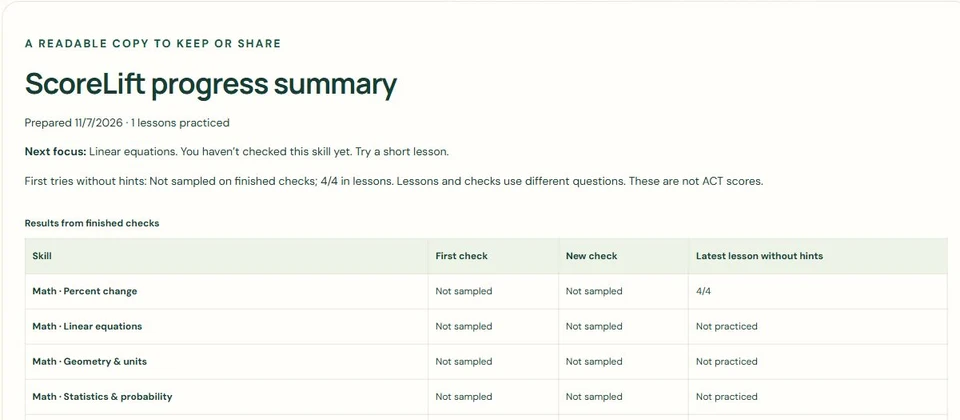
If you’re choosing prep for your student, try the lesson together. It’s free to open without an account. The sample report shows what completed skill checks look like in ScoreLift.
Your data
How ScoreLift uses your information
Practice and account information
ScoreLift uses answers, confidence choices, completed lessons, notes, writing drafts, and settings to save your place and show what to practice. Guest study work stays in your browser. If you sign in, ScoreLift saves eligible study work to your account so you can continue on another device. You choose whether to add earlier guest work.
Google Firebase handles student sign-in, verification, and password resets. ScoreLift receives an account identifier and basic profile information such as a name or email. Earlier accounts may use ChatGPT sign-in. ScoreLift does not store your sign-in password.
Payments and support
Stripe handles checkout and card details. ScoreLift records your plan, payment status, transaction references, and access dates to manage your purchase. ScoreLift does not receive your card number or send practice answers to Stripe.
If you use the support form, we use the details you provide to review and respond to your request. Cloudflare Turnstile checks for automated submissions. An email delivery service sends your message to the ScoreLift support inbox. Please leave out passwords, card details, and other sensitive information.
Optional measurement
You can choose to share usage events with Google Analytics to help us improve lessons and other features, or share purchase measurement with Google Ads. Usage events include things like starting a mock or playing an explanation. Your answers, scores, drafts, and email stay out of these events. You can change your choices anytime. Measurement preferences
Download or delete your work
Use Account to download a progress report, export a full backup, or delete saved study work. Guest and signed-in work are stored separately. A small reset record helps stop another device from restoring deleted work when it next connects.
Deleting study work is separate from closing a sign-in account or deleting billing records, support messages, provider security logs, or files you downloaded. Contact support with questions about your information or help with an account request.